
Define the Tiers in a Tier Scheme
A Tier Scheme comprises one or more Tiers, or levels, through which your Members can progress. A typical use case for Tiers is to offer better discounts or other rewards at higher levels, as a way to incentivize your Members to engage with and make purchases within your loyalty program.
To define the Tiers in a Tier Scheme:
-
Select Rules from the top navigation bar, then select Tier Schemes from the side navigation menu. The Tier Schemes screen is displayed.
-
Search for and select the desired Tier Scheme (see
-
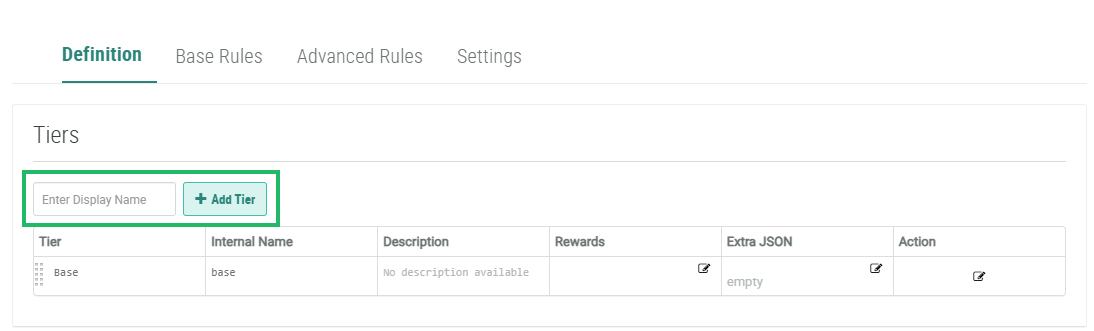
In the Display Name field in the Tiers section, enter the name of the new Tier.
-
Click Add Tier. The Edit Tier pop-up window is displayed.
-
The Display Name field is populated with the value you entered above; optionally edit this value.
-
The Internal Name is automatically populated based on the Display Name value. This field is not editable by default. To edit the Internal Name, check Edit Internal Name. A confirmation dialog box is displayed; click Ok. Edit the Internal Name value.
-
Optionally, in the Description field, enter a description of this item.
-
Click Save. The new Tier is added to the list within the Tiers section.
-
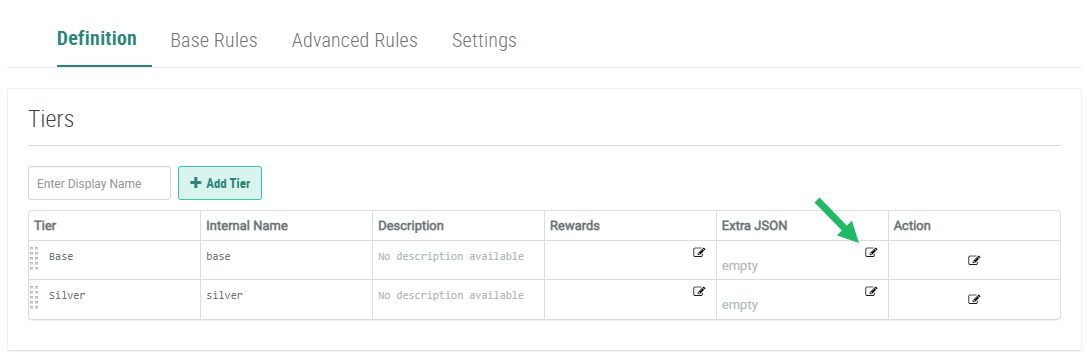
Optionally, to extend the standard JSON payload when exporting Tier information, click the Edit icon within the Extra JSON column. The Extra JSON pop-up window is displayed. Enter the desired JSON code, then click Save.
-
Repeat the above steps as needed to define the remaining Tiers in the Tier Scheme.
Optionally, you can assign a Reward to a Tier. When a Member reaches this Tier, the platform automatically grants the assigned Reward to the Member. See Assign a Reward to a Tier for more details.
